As you can see from the above video, I’ve improved the countdown and added an end goal to strive for. The idea for the countdown was given by a friend who wanted you to be able to spin the tires before the race – like in Mario Kart, or other racing games. I incorporated that into the game, as I feel like it makes it better. You may also notice I finally added and end goal! After 3 laps a “Thank you for playing” sign will come up. I of course will add a button to replay or quit the game in a future update!
Category: Uncategorised
Game Test update!
I fixed the issue with the AI Opponent slamming into the pole by the finish line – it turns out the waypoint was out of sync! It was a simple fix, all I had to do was move the waypoint slightly, and now the AI goes avoids the poles seamlessly!
Major update! UI, programming and rubberband AI beginnings
As you can see from the above video, I’ve gone and added more stuff to the game! I’ve gotten rid of the stock Unity models and replaced them with car models I got from the unity store, improved the opponent AI a little – you can see how he speeds up at the start to get first place, before slowing down a little as he reaches second place. Speaking of places – I’ve incorporated those into the game! Now the game will know who’s in first place and who’s in second place. On top of this I have also incorporated a lap counter, pushing it much closer to a proper game!
Rubberband AI
Just a short update explaining what rubberband AI is.
Rubberband AI is a common feature in racing games. It’s an AI feature where your opponents will slow down if they’re too ahead of you – or speed ahead if you’re too ahead of them. This keeps the challenge of the game going, as the player would get bored if the AI is too far ahead of them, or way behind them. It’s named after a rubberband, as you can imagine one around the player and the opponents. If they stretch the rubberband too far, the harder you’ll be pulled towards them, and vice versa. This keeps everything on an even playing field, and keeps the player engaged with the game.
Major update: AI Beginnings
Good news! I’ve incorporated a simple AI System into the game, where the AI Opponent chases after waypoints. I incorporated Unity’s own Car AI for this… but it isn’t perfect. Not by a long shot.
As you can see from the above video, the AI is very strict on it’s path – I want it to be looser, using the boxes as a guideline. Luckily, I have a feeling like I know how to do that.
Secondly – if the car gets too far ahead, it’s difficult for the player car to catch up – I’ll need to integrate a rubberband style system in order to keep the game fun.
And lastly – bugs. The car will go into the pole at the end 100% of the time, and I’ve seen it fly entirely off the track before – and if the player knocks into it – they’re out of the race. Quite literally. So some major adjustments need to be made… which will be made for the next update! So look forward to new and improved car AI!
Update!
Some exciting things abound this update! First off I drastically improved how the game looks!
As you can see from the image below, I placed a lot of trees, and placed a start line!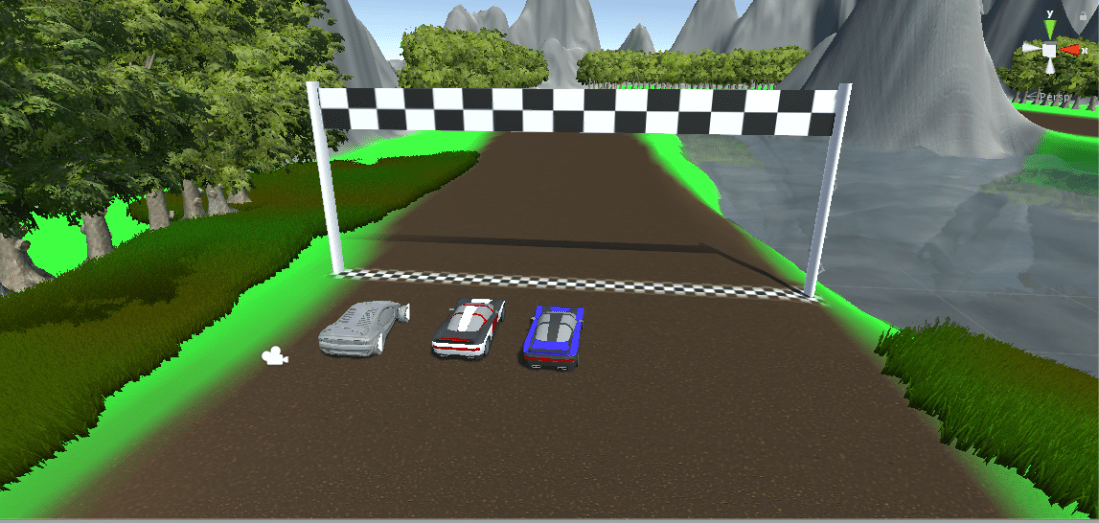
But that’s not all – this update is centered around the start line – I realized this needed doing before doing the AI itself. What you can’t see is a collider – two of them in fact – which will help record the laps the player completes. The reason I used two was so that the player can’t just reverse back and forth and win the game. They require passing a checkpoint of sorts first before the collider comes in and adds 1 to the players lap count.
Further updates to come!
Hello everyone!
I apologize for the delay. However, I assure you all that I have been hard at work learning Unity – as I was quite rusty at using it, even after college. However, I have now created a terrain, textured it with textures I created in Adobe Photoshop and even managed to get a car moving – though at this stage most of it is the prefab that Unity bundles with the engine.
Below is my scene, as it appears. The track for the game is a simple oval, circling a small lake that I created, surrounded by mountains. I got the lake simply by raising the entire terrain by a little bit, then simply lowering the parts that I wanted to have filled with water. I then added a water effect which was bundled with unity and it gives the scene a nice feeling. I may, however adjust the surrounding mountains as I dislike how sharp and angular they are in their current state.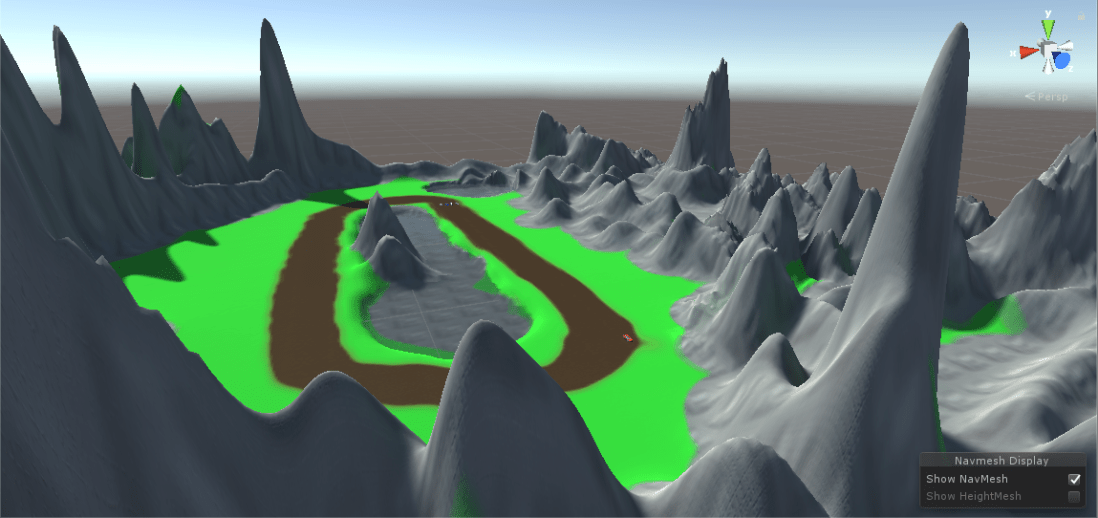
Another thing I added were the models that I am going to use for the player car and their opponents. I also added a unity prefab car, and discovered that the default controller works well, but needs heavy tweaking as the handling is very slippery, as shown in this video.
I dislike how slippery the current car feels, so I’ll be adjusting the code myself in order to make the game play better – not to mention removing the standard model and inserting one of the ones I got from the asset store.
On top of this next time I will have a simple AI Car which will follow waypoints around the map in order to complete a circuit, before adding more complex scripts which will supplement it’s behaviour by overtaking the player, or even slow down if it’s too far ahead of the player.
See you next time!
Update!
Hey all, Gethin here, with another update on the development of my game! Since last time I’ve done a lot of research into the unity engine, and have narrowed down what assets I want to use. I’ll be using the unity asset store to get my assets because I’ve not touched Autodesk Maya in a while, and the unity asset store will suffice with what I want to create. For the cars I will be using, I have decided I will use
https://assetstore.unity.com/packages/3d/vehicles/land/cartoon-sport-cars-60618
as it is perfect for the game I am creating. I have also developed a game plan of sorts for my game, where I will go about it in stages. The biggest thing I will focus on at the start is player control – I want the car to handle like a car, make sure it doesn’t get stuck on geometry. Then I will create the game world, which will be that of a race track, and then I will develop the core aspects of the game, such as the AI of the opponents, the goal of the game, where the player finishes three laps, and the game calculates their placement in the race, and the time it took them to finish. To do these I will use my knowledge, but if I use any online resources, I will let you all know by posting a link to the resource during my weekly update, similar to how I did above.
Look forward to next week as I should have pictures – and if all goes well – a video to go alongside it, showing the player control a car. I hope you all look forward to it!
First update!
Hello and welcome to my blog, where I will give you updates on my game development! My name is Gethin, a 21 year old university student studying Creative Tech in the university of Bangor.
This blog will be focused primarily on the game that I will be creating. It will be a racing game created in the Unity engine. Why Unity? It is extremely easy to use, and it helps that I’ve got a background working with it, thanks to my college course. I chose a racing game because I feel like I can really show off artificial intelligence by doing this, as that is the main focus of creating this game. I’ll also try and make it a fun game, so I hope you look forward to my next update!
– Gethin
The Journey Begins
Thanks for joining me!
Good company in a journey makes the way seem shorter. — Izaak Walton

 Gethin's house of game development